To delete a series in Outlook, you can right-click the reservation on your Outlook calendar and select Delete. You will be given the option to delete the occurrence or delete the series. You can also open the reservation (selecting either occurrence or series at the prompt) and select Cancel Meeting or Delete.
You also have the option of removing the MRM resource but retaining the Outlook appointment:
Double-click on the reservation to open. Verify
if you are opening an occurrence or the series. Select
the MRM Tab.
Deselect the Resource. The
Resource Tab and all associated MRM details are removed.
Select the Appointment Tab. The
MRM Resource has been removed from the Location field. Enter
a new location if needed (i.e. a resource not managed in MRM or a
conference bridge) and select Save or Send Update.
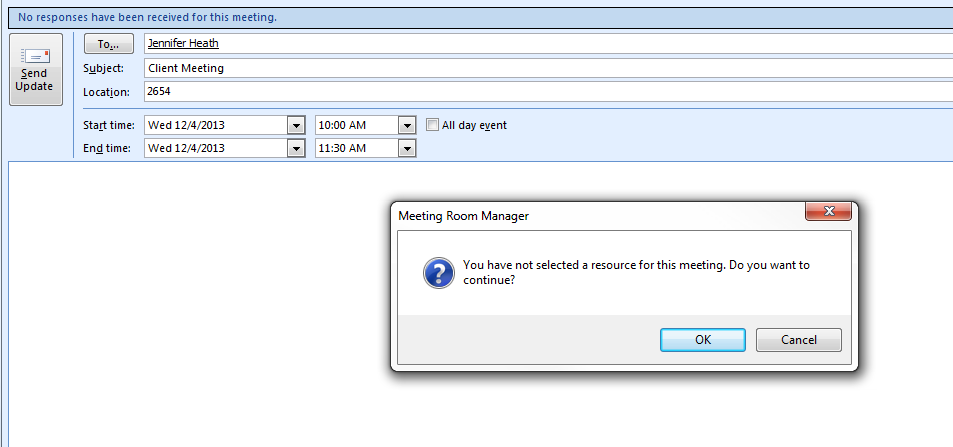
You will receive a prompt that you do
not have an MRM resource selected. This is to prevent the
unintended deletion of an MRM reservation. Click OK at
the prompt. The reservation saves and closes, updated invitations
are sent if required, and you are returned to the Outlook Calendar.
On the Outlook calendar, you can still see your recurring appointment, but looking in the MRM Web Client, the recurring reservation has been removed.
|
|
We are interested in hearing from you about our products. Visit our customer support portal. Written for Meeting Room Manager 10.0, March 2014, Copyright © 2014 Asure Software Inc. |