This workflow is typically used in conjunction with Standard Services. Contact your MRM Administrator for more details on your unique configuration.
End user creates a reservation. Details
are selected on at least one tab that has the HasReq setting set to
True. This defines the reservation has “having requirements”,
and the reservation is saved in a tentative status.
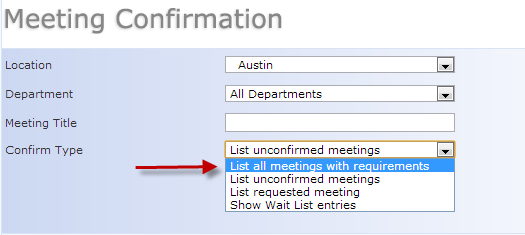
The Location Admin can navigate to the Confirmation queue by selecting Confirm & Approve in the MRM Task Bar. Set the location as needed, and select “List all meetings with requirements”.
Click the email icon to generate the Confirmation email if needed.
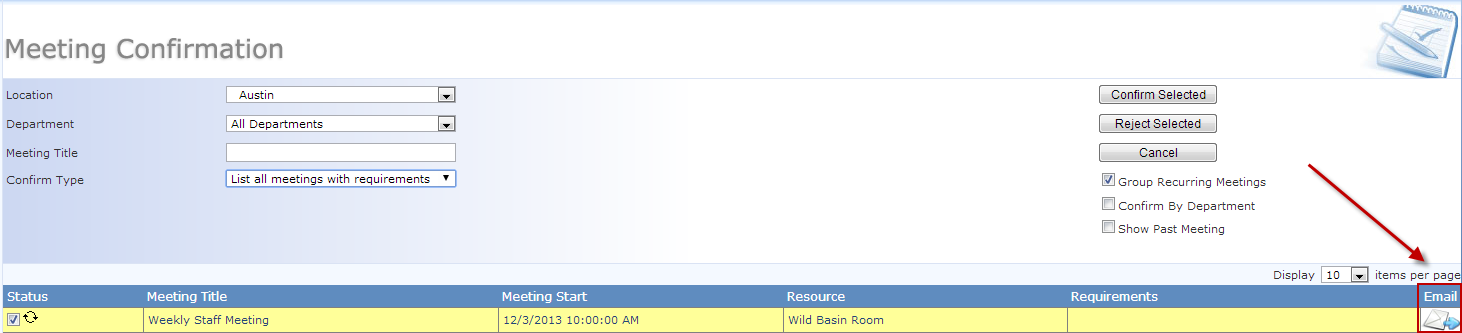
 If you are using the Confirmation email, you must send the email
prior to confirming the reservation. Once
the reservation is confirmed, it is removed from this queue, and the
If you are using the Confirmation email, you must send the email
prior to confirming the reservation. Once
the reservation is confirmed, it is removed from this queue, and the
email icon is no longer available. This email does not send automatically upon selecting Confirm.
Check the box next to the reservation
and select Confirm.
Any edits to the reservation will reset the status to tentative, and the reservation will display in the Confirmation queue for approval.
|
|
We are interested in hearing from you about our products. Visit our customer support portal. Written for Meeting Room Manager 10.0, March 2014, Copyright © 2014 Asure Software Inc. |